Accepting the Microsoft Customer Agreement (MCA)
What is the MCA? The Microsoft Customer Agreement (MCA) is a digital contract that all customers must accept to purchase or renew Microsoft licensing—including Microsoft 365, Azure, and perpetual on-premises licenses. Microsoft updated the MCA in April 2023. If you accepted the MCA before this date, or have never accepted it, you must do so before any new purchases or renewals.
Who should accept the MCA? Ideally, the customer organization should accept the MCA directly. This ensures compliance and maintains a clear record of acceptance. While your account team can assist with guidance, it is best practice for the customer to complete the acceptance process themselves. If you do not have the required credentials, please contact your account team for support, but note that acceptance by your organization is preferred.
Steps to Accept the MCA:
1. Ensure you have the right credentials: You need access to your organization's Microsoft 365 tenant with Global Administrator privileges. If you do not have these credentials, please reach out to your IT administrator or account team.2. Go to the MCA acceptance page: Visit https://admin.microsoft.com/AdminPortal/Home?ref=/BillingAccounts/agreement.
3. Sign in: Log in using your Global Administrator account.
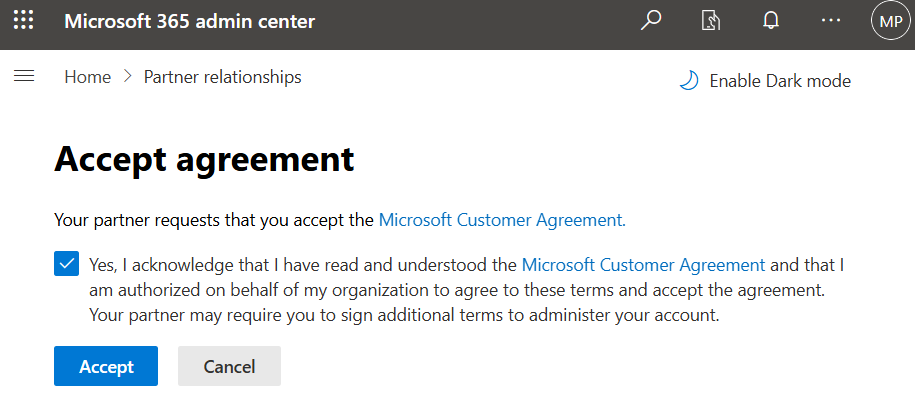
4. Review and accept the agreement:
- Read the MCA presented on the page.
- Check the box that says “Yes, I acknowledge …”
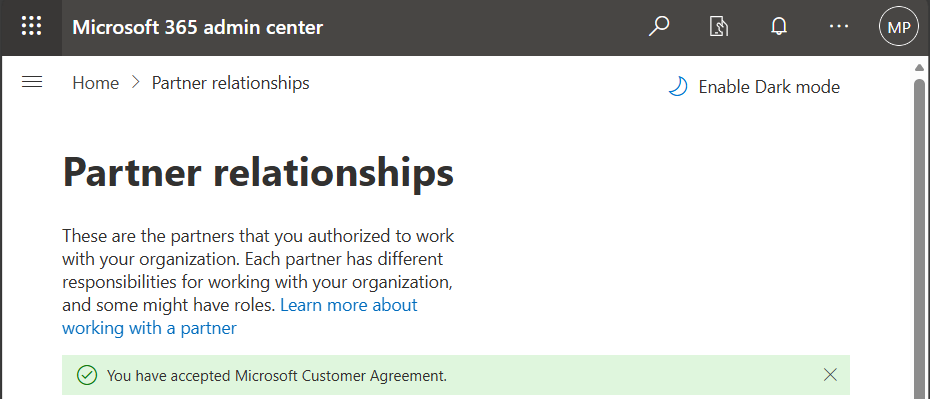
- Click the Accept button.
If you cannot access the required credentials:
- Contact your IT administrator or account team for assistance.
- In rare cases, your account team may be able to attest acceptance on your behalf using Microsoft’s Partner Center APIs, but this is not the preferred method and may be subject to additional verification steps. Microsoft is moving towards requiring direct customer acceptance for compliance and audit purposes.
Why should customers accept the MCA themselves?
- Direct acceptance ensures your organization’s compliance and maintains a clear audit trail.
- It reduces risk and liability for both your organization and your Microsoft partner.
- Microsoft is phasing out partner attestation via manual or bulk tools; after January 2026, only API-based attestation or direct customer acceptance will be valid.
Additional Resources:
Summary: Whenever possible, please accept the MCA yourself using your Global Admin credentials. If you need help, your account team is available to guide you through the process, but direct acceptance is always preferred for compliance and security.